Thinking in React.js Way.
I'm developer from Bangladesh.
Reactjs can change your thought about the designs and the app build. When you build a UI with React, you will first break it into parts called components. Then, you'll describe the different visual states for each of your components. Finally, connect the components so that the data flows through them. In this blog, I'll guide you through the thought process with react building system.
Start with the mockup
Imagine that you already have a JSON API and mockup from a designer.
The JSON API return some data:
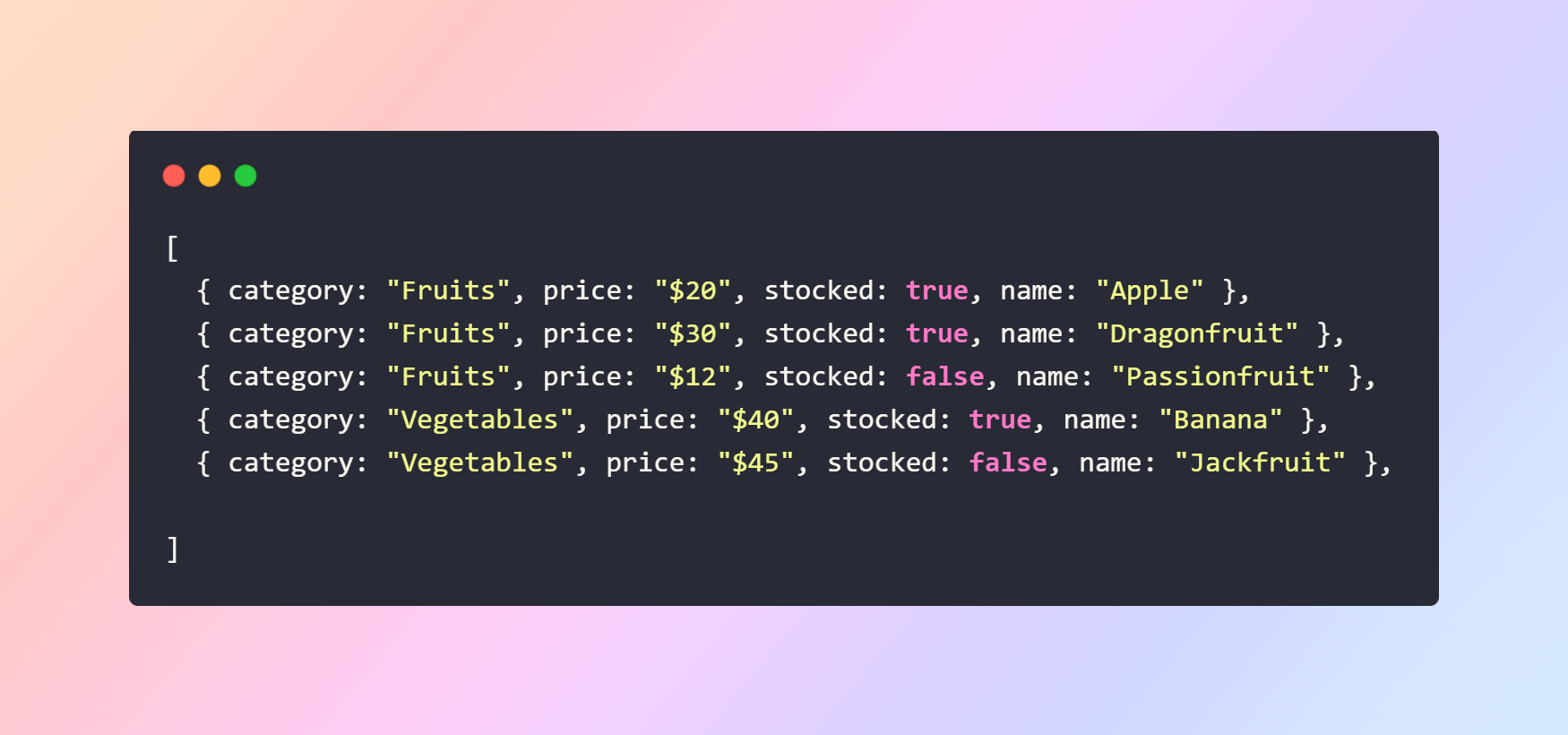
To implement a UI With React.js, you have to follow five steps.
Step 1: Break the UI into a component hierarchy
If you work with designers you already have names of the components. Either way, you can start by drawing boxes around every component & subcomponent in the mockup and naming them.
Depending on your work type, you can think about splitting up a design into components in multiple ways:
Programming - use the same techniques for deciding if you should create a new function or object. One such technique is the single responsibility principle, that is, a component should ideally only do one thing. If it ends up growing, it should be decomposed into small subcomponents.
CSS - Consider what you would take class selectors for.
Design - consider how you would organize the designer's layers.
if your JSON is well structured, you'll find that it naturally maps of the UI of the components structure, cause UI & data models have the same information architecture-that's the shape. Separate your UI into components, where components matches one piece of data model.
There are five components here:
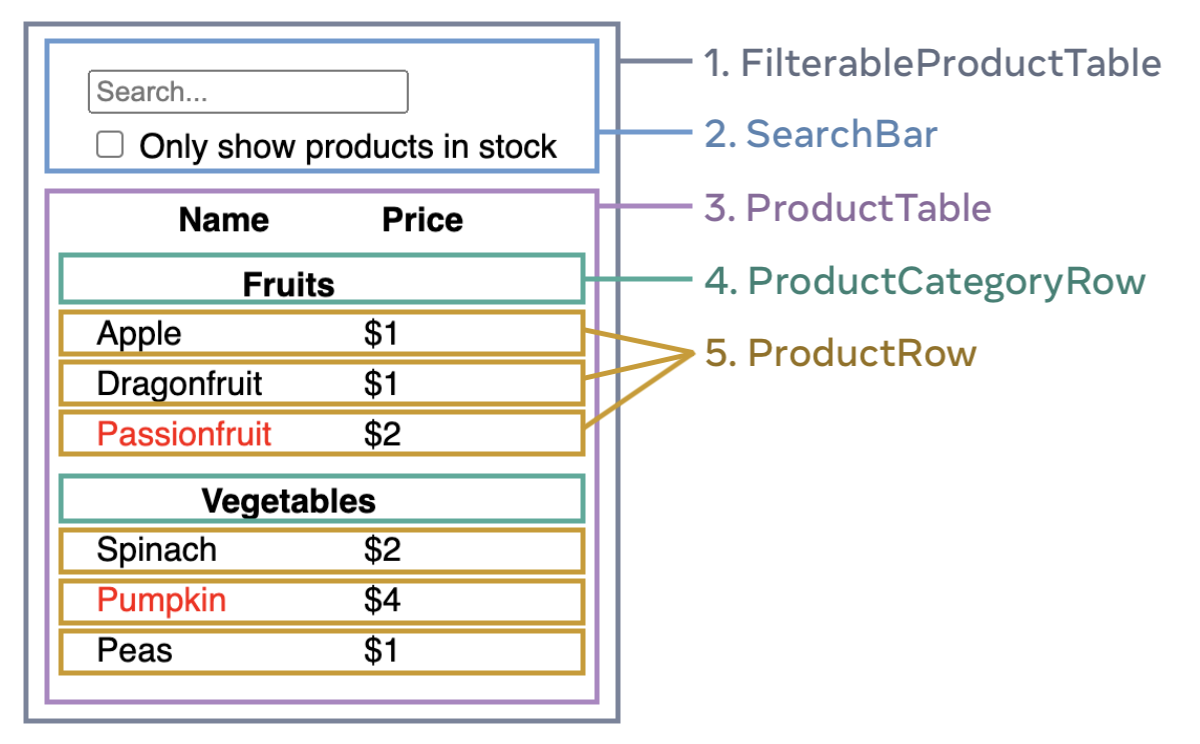
By looking into this model you can identify the components. Now arrange them into a hierarchy. If a component appears within another component in the mockup should be considered a child component in the hierarchy. Such as ->
FilterableProductTable
Searchbar
productTable
ProductCategoryRow
ProductRow
Step 2: Build a static version in React
Building a static version of your app involves creating the user interface (UI) components based on your component hierarchy and rendering them using the data model.
To build a static version of your app that renders your data model, you'll like to build components that reuse other components and pass data from props (Props are a way of passing data from parent to child). |
You can choose two ways to build this app. 1. Top-down means to start building the components higher up in the component hierarchy (like FilterableProductTable) & 2. Bottom-up means working from components lower down (like ProductRow).
In larger projects it's easier to go bottom-up.
function ProductCategoryRow({ category }) {
  return (
    <tr>
      <th spanCol="2">
        {category}
      </th>
    </tr>
  );
}

function ProductRow({ product }) {
  const name = product.stocked ? product.name :
    <span style={{ color: 'green' }}>
      {product.name}
    </span>;

  return (
    <tr>
      <td>{name}</td>
      <td>{product.price}</td>
    </tr>
  );
}

function ProductTable({ products }) {
  const rows = [];
  let lastCategory = null;

  products.forEach((product) => {
    if (product.category !== lastCategory) {
      rows.push(
        <ProductCategoryRow
          category={product.category}
          key={product.category} />
      );
    }
    rows.push(
      <ProductRow
        product={product}
        key={product.name} />
    );
    lastCategory = product.category;
  });

  return (
    <table>
      <thead>
        <tr>
          <th>Name</th>
          <th>Price</th>
        </tr>
      </thead>
      <tbody>{rows}</tbody>
    </table>
  );
}

function SearchBar() {
  return (
    <form>
      <input type="text" placeholder="search products" />
      <label>
        <input type="checkbox" />
        {' '}
        just to show products in stock
      </label>
    </form>
  );
}

function FilterableProductTable({ products }) {
  return (
    <div>
      <SearchBar />
      <ProductTable products={products} />
    </div>
  );
}

const PRODUCTS = [
  {category: "Fruits", price: "$1", stocked: true, name: "Jackfruit"},
  {category: "Fruits", price: "$1", stocked: true, name: "Apple"},
  {category: "Fruits", price: "$2", stocked: false, name: "Banana"},
  {category: "Vegetables", price: "$2", stocked: true, name: "Jinger"},
  {category: "Vegetables", price: "$4", stocked: false, name: "Cucumber"},
  {category: "Vegetables", price: "$1", stocked: true, name: "Fishfinger"}
];

export default function App() {
  return <FilterableProductTable products={PRODUCTS} />;
}
You'll have a library of reusable components that render data from model. Cause it is a static app and these components will return JSX. At the top of the hierarchy (FilterableProductTable) will take your data model as a prop.
NOTE: At this point, you should not be using any state values.
